Doom Voice Changer changes your voice live — man to woman, woman to man, younger or older, or your own private voice —
on WhatsApp, Zoom, Google Meet, OBS and Discord. It runs on your laptop's processor. No graphics card needed.
Pay once — every update after that is free for your account. Live minutes are paid from your wallet only while the voice is on.
How it works
Doom sits between your microphone and your apps. It hears you, re-speaks your words in the voice you picked,
and hands that voice to a free audio driver called VB-CABLE. Your apps use VB-CABLE as their microphone.
Your microphone
You talk normally
Doom, on your laptop
Re-speaks you in the new voice
WhatsApp, Zoom, OBS…
Hear the new voice through CABLE Output
Runs on your laptop
Your voice is changed on your own processor and never uploaded during calls.
Real AI voices
AI voices sound like a different person, not a sped-up recording. Classic effects are there too.
Try free first
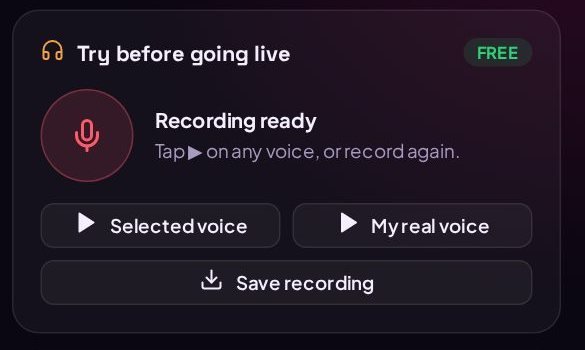
Record 10 seconds and hear yourself in any voice before paying a single minute.
Pay as you talk
Minutes come from your Doom Flasher wallet only while Live is on. It pauses itself when you go quiet.
Get Doom Voice Changer
₦5,000.00one time
The Windows and Mac app, on as many of your laptops as you like
Every future update free for your account
Free 10-second previews of every voice
Live minutes charged per minute from your wallet, only while the voice is on
No account? Create one, fund your wallet, then come back here.
Will it run on my laptop?
Most laptops from the last 6 years are fine. Use the free preview to check before going live.
Windows
Windows 10 or 11, 64-bit. AI voices: Intel Core i5 (8th gen or newer), AMD Ryzen 5 (2000 or newer) or better. Classic voices run on almost any laptop.
Mac
macOS 11 Big Sur or newer. Any Mac with an Apple chip (M1, M2, M3, M4), or an Intel Mac from 2017 or newer.
Memory
4 GB RAM minimum, 8 GB recommended
Space
About 200 MB
Graphics card
Not needed
Internet
Needed to sign in and for billing (uses very little data)
Microphone
Any. An earphone or headset mic gives the clearest AI voice.
Audio driver
Free: VB-CABLE on Windows, BlackHole 2ch on Mac — the app shows you how to install it
Not available for iPhone, iPad, Android phones, Linux or 32-bit Windows.
Step-by-step guide
From download to your first call. Takes about 10 minutes the first time.
Steps for
1Get the app
Log in to Doom Flasher, make sure your wallet has at least ₦5,000.00, then press
Pay ₦5,000.00 and download above.
You pay once. After that this page always shows a Download button for your account, and every update is free.
Your browser saves a file called DoomVoiceChanger-Setup-0.4.0.exe to your Downloads folder.
Your browser saves a file called DoomVoiceChanger-0.4.0-mac.dmg to your Downloads folder. One file works on every Mac — Apple chip or Intel.
If your browser warns about the file: it's only because the app is new. In Chrome, click Keep. In Edge, hover over the download, click … → Keep → Show more → Keep anyway.
2Install it, and click "Run anyway"
Double-click the file you downloaded. Because Doom Voice Changer is new, Windows shows a blue box saying
"Windows protected your PC" and Unknown publisher. This is normal for new apps that haven't built up a download history with Microsoft yet.
Windows protected your PC
Microsoft Defender SmartScreen prevented an unrecognised app from starting. Running this app might put your PC at risk.
The installer opens. Click Next and Install. It installs just for you and doesn't need an administrator password. When it finishes, Doom Voice Changer opens by itself and puts a shortcut in your Start menu.
If your antivirus asks about the file, choose Allow. Only download Doom Voice Changer from this page.
The first time the app starts on an older laptop, Windows may also install Microsoft Edge WebView2 (the part that draws the app's window). That happens automatically and needs internet.
Put the app in Applications. Open the .dmg you downloaded. In the window that opens, drag Doom Voice Changer onto the Applications folder. Then eject the disk (right-click "Doom Voice Changer" on your desktop or in Finder's sidebar → Eject).
Open it the first time. Go to Applications and double-click Doom Voice Changer. Because the app is new and not yet registered with Apple, your Mac stops it the first time with a message like "Doom Voice Changer" Not Opened. This is normal. Allow it once like this:
“Doom Voice Changer” Not Opened
Apple could not verify “Doom Voice Changer” is free of malware that may harm your Mac or compromise your privacy.
DoneMove to Trash
1. Click Done (not Move to Trash)
System Settings › Privacy & Security
Security
“Doom Voice Changer” was blocked to protect your Mac.
Open Anyway
Then enter your Mac password (or Touch ID) and click Open Anyway again.
2. Click Open Anyway
aClick Done on the message.
bOpen the Apple menu () → System Settings → Privacy & Security.
cScroll down to Security. Next to "Doom Voice Changer was blocked…", click Open Anyway.
dEnter your Mac password (or use Touch ID), then click Open Anyway once more. The app opens — from now on it opens normally.
eWhen your Mac asks "Doom Voice Changer" would like to access the microphone, click Allow.
On an older Mac (macOS 14 Sonoma or earlier) there's a shortcut: in Applications, hold Control and click Doom Voice Changer → Open → Open.
If your Mac says the app "is damaged and can't be opened": the download was marked as untrusted. Open the Terminal app (Applications → Utilities), paste this line, press Return, then open Doom again:
xattr -cr "/Applications/Doom Voice Changer.app"
Forgot to allow the microphone? System Settings → Privacy & Security → Microphone → switch on Doom Voice Changer, then quit and reopen the app. The app also shows a button that takes you straight there.
3Sign in with your Doom Flasher account
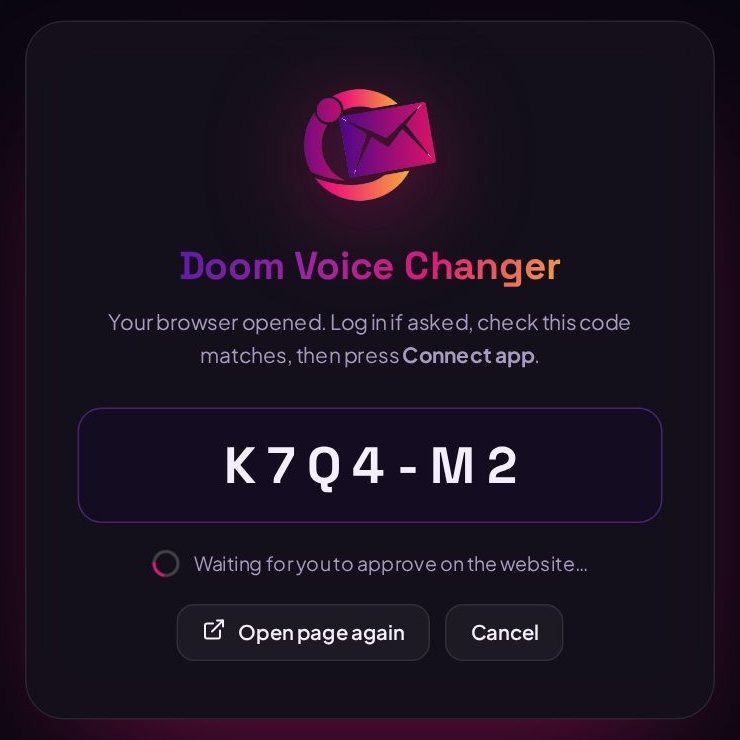
Click Sign in with Doom Flasher in the app. Your browser opens our website and the app shows a short code. Check that the code on the website matches, then click Connect app. The app signs in by itself a few seconds later. You never type your password into the app.
4Install VB-CABLE (one time)
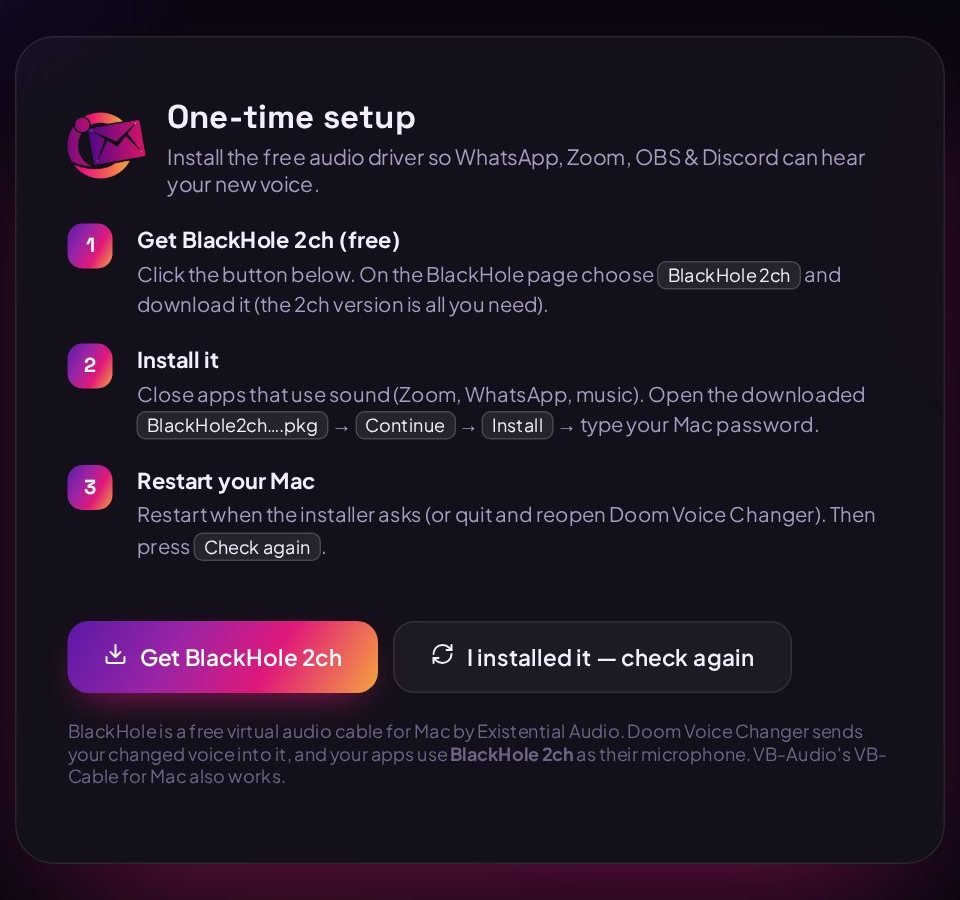
On a Mac, your new voice travels to other apps through BlackHole 2ch, a free virtual audio cable by Existential Audio. If it isn't installed yet, the app shows this screen:
aClick Get BlackHole 2ch in the app (or open existential.audio/blackhole). Choose BlackHole 2ch — the 2-channel version is all you need — and download it using one of the options on that page.
bClose apps that use sound (Zoom, WhatsApp, music). Open the downloaded BlackHole2ch….pkg → Continue → Install → enter your Mac password.
cRestart your Mac if the installer asks (or quit and reopen Doom Voice Changer). Then click I installed it — check again.
Comfortable with Terminal and Homebrew? brew install blackhole-2ch does the same. VB-Audio's "VB-Cable for Mac" also works.
Important: don't set BlackHole as your Mac's speaker. Doom handles it. If your Mac goes silent, open System Settings → Sound → Output and pick your speakers or headphones again. You also don't need a "Multi-Output Device" (some BlackHole guides suggest one) — with Doom it makes the other person hear your voice twice.
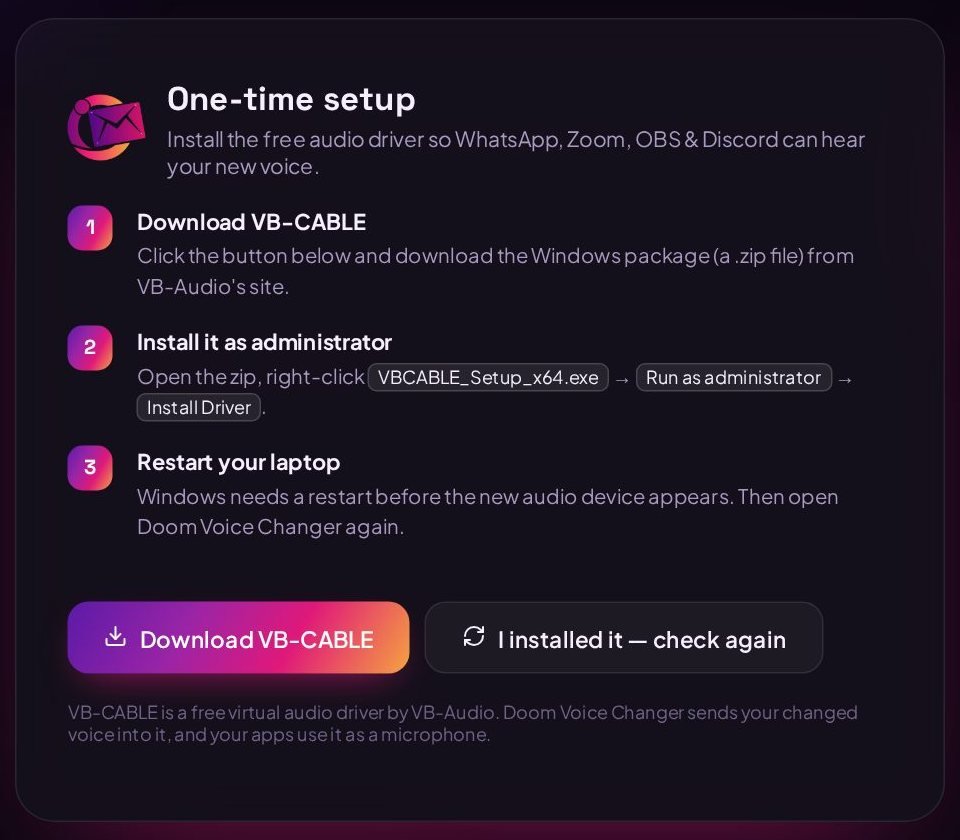
VB-CABLE is a free audio driver from VB-Audio. Doom sends your new voice into it, and your apps use it as their microphone. If it isn't installed yet, the app shows this screen:
Click Download VB-CABLE, open the zip file, right-click VBCABLE_Setup_x64.exe → Run as administrator → Install Driver. Restart your laptop, then open Doom Voice Changer again.
5Try voices for free
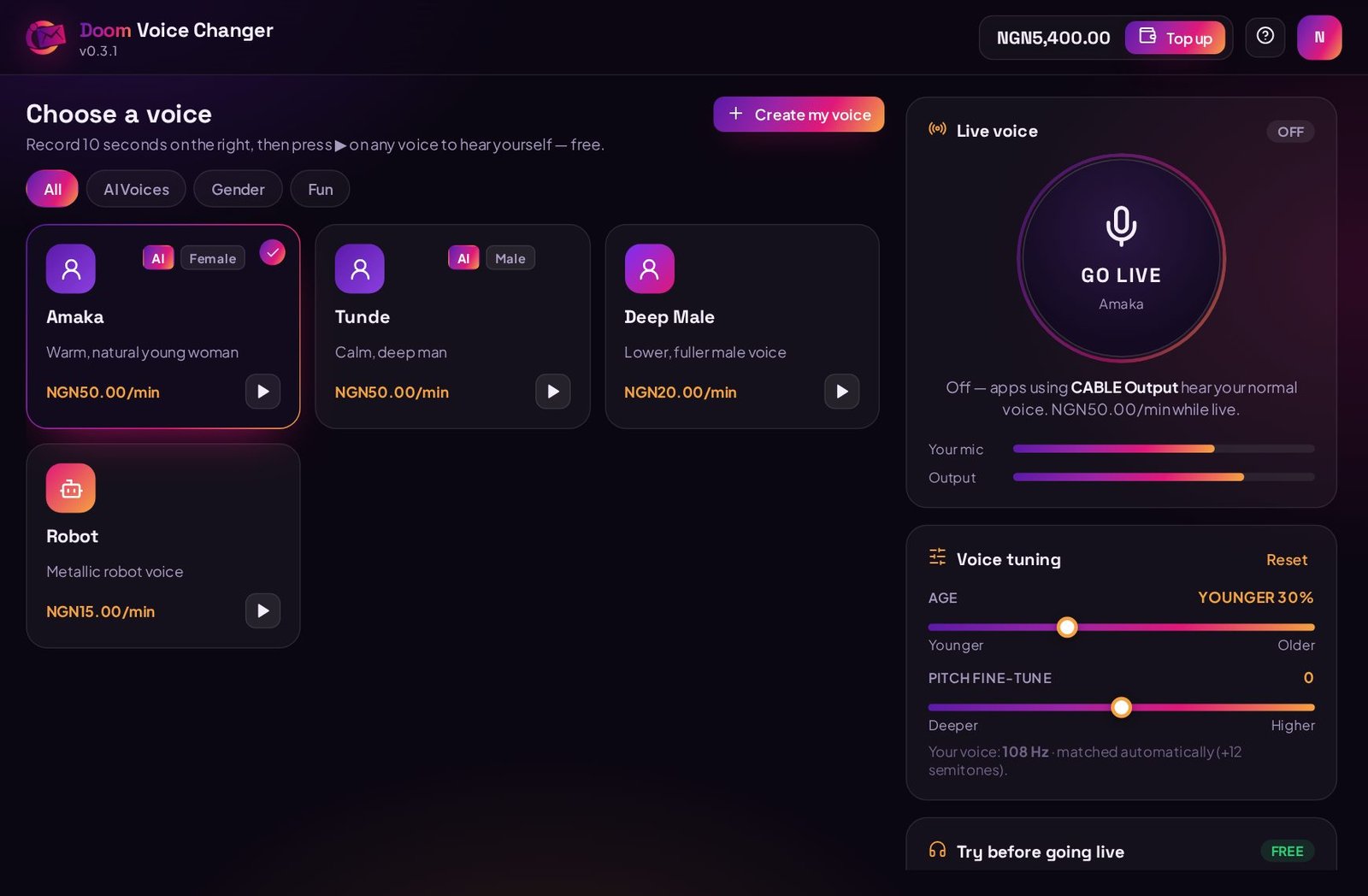
Under Try before going live, press the red mic, say a sentence or two (up to 10 seconds), then press ▶ on any voice to hear yourself in it. Previews are free and never leave your laptop. Use headphones so you hear it clearly.
For the clearest AI voice: use an earphone or headset mic and talk at a normal pace. Many laptop mics "clean up" your voice, which confuses the AI. On a Mac, set System Settings → Sound → Input volume to about three quarters. In Windows go to Settings → System → Sound → click your microphone and turn Audio enhancements (and Voice clarity, if you see it) off.
6Pick and tune your voice
Click a voice card to choose it. AI voices sound like a real different person. Classic voices are fun effects like Robot or Radio. Each card shows its price per minute.
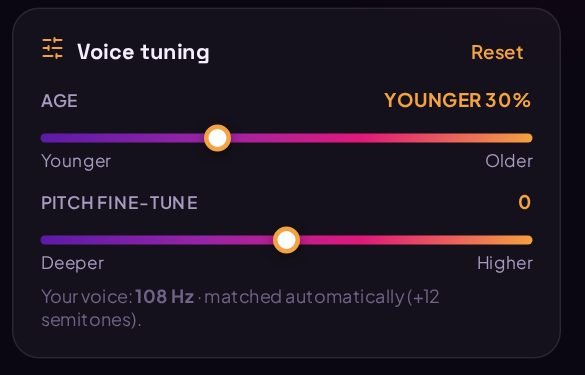
AI voices match your pitch automatically — a man picking a female voice lands in a woman's range without touching anything. Under Voice tuning you can make it sound younger or older and fine-tune the pitch.
7Go Live in WhatsApp, Zoom, OBS…
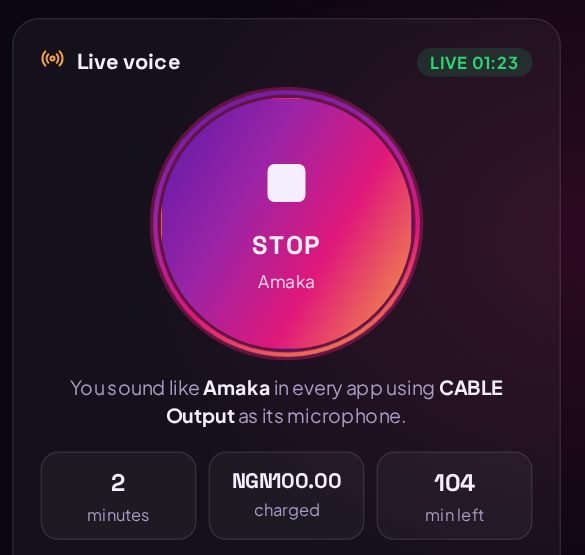
Press the big GO LIVE button. Then, in the app you're calling from, choose CABLE Output (VB-Audio Virtual Cable) as the microphone. Keep your normal headphones or speakers as the speaker. Keep Doom open while you talk.
Use WhatsApp Desktop on the laptop. During a call, click the arrow next to the mic button → Microphone → CABLE Output. To set it for every call: Settings → Video & voice → Microphone.
Settings → Audio → Microphone → CABLE Output. Untick "Automatically adjust microphone volume" and set background noise suppression to Low.
In the meeting, click the arrow next to the mic (or ⋮ → Settings → Audio) → Microphone → CABLE Output. Works the same in other browser calls.
Sources → + → Audio Input Capture → Device: CABLE Output. Mute your normal Mic/Aux source so viewers only hear the new voice.
User Settings → Voice & Video → Input Device → CABLE Output. Turn Noise Suppression off for the cleanest sound.
While Live is off, apps using CABLE Output simply hear your normal voice, so you can leave them set to it all the time. Want to hear yourself? Plug in headphones and switch on Hear myself in the Audio card.
8Create your own private voice
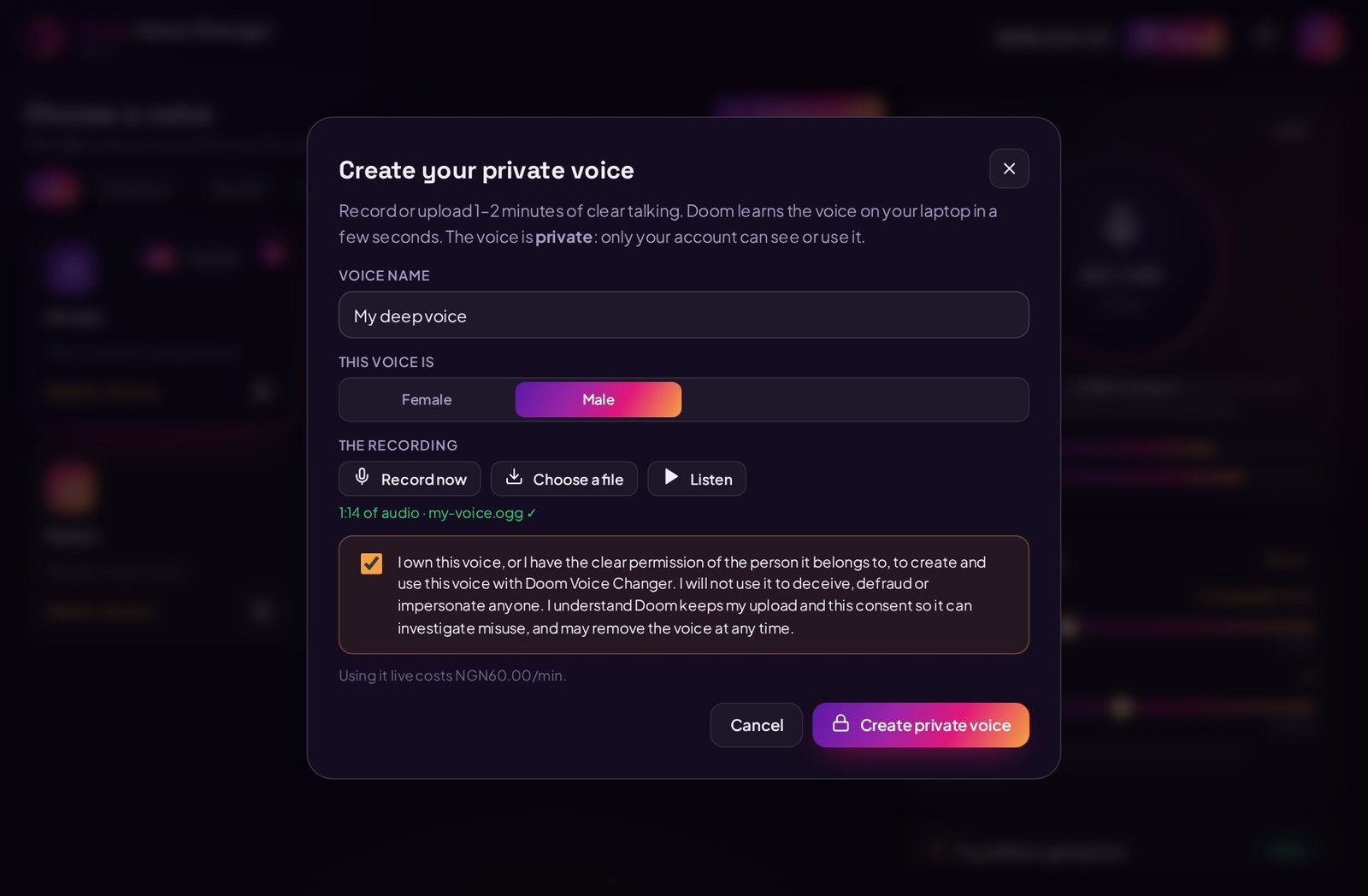
Click + Create my voice above the voice list. Give it a name, then record 1–2 minutes of clear talking (the app shows you something to read) or choose a file — WAV, MP3, M4A or a WhatsApp voice note all work. One person talking, no music, quiet room.
You must tick the box confirming you own the voice or have the owner's permission. The app learns the voice on your laptop in a few seconds and it appears in your list marked Private — no other account can see or use it. Using someone's voice without permission, or to deceive anyone, gets the voice removed and can get your account blocked.
9How you are charged
Live minutes come from your Doom Flasher wallet, charged per started minute, only while Live is on. New accounts get some free minutes first. The app shows the minutes used, the amount charged and how many minutes you have left.
To protect your balance, Doom pauses itself after a quiet stretch and stops if you lose internet. Previews are always free. Each session appears as one line in your account history. Top up any time from your wallet.
10Updating the app
When a new version is out, the app shows Update available (or Update required if the old one can no longer go live). Updates are free once you own the app.
aClick Update in the app. This page opens — or just come back to doom.hqflasher.com/voice-changer.
bClick Download version …. You won't be charged again.
cClose Doom Voice Changer (stop Live first), then open the new file. Windows may show the blue box again — click More info → Run anyway.
dClick through the installer. It replaces the old version and keeps your sign-in, settings and voices. No need to uninstall first.
cQuit Doom Voice Changer (stop Live first, then press ⌘ Q). Open the new .dmg and drag the app onto Applications again → click Replace.
dOpen it from Applications. If your Mac blocks it again, repeat step 2 (System Settings → Privacy & Security → Open Anyway). Your sign-in, settings and voices are kept.
What's new
Version 0.4.0
Latest
8 October 2026
Doom Voice Changer is now on Mac — Apple chip (M1–M4) and Intel Macs, macOS 11 or newer. One payment covers Windows and Mac.
Easy Mac setup: the app walks you through installing the free BlackHole audio cable and allowing the microphone.
New warning when no sound is coming from your microphone, with a button that opens the right settings.
The app no longer picks the virtual cable as your microphone or speakers by mistake.
Small fixes and speed improvements.
Version 0.3.1
2 October 2026
First public release of Doom Voice Changer
Realistic AI voices: man to woman, woman to man
Automatic pitch matching, so the new voice fits your natural pitch
Age slider (younger or older) and pitch fine-tune
Create your own private voice from a recording or WhatsApp voice note
Free 10-second preview of every voice before you go live
Works with WhatsApp, Zoom, Google Meet, OBS, Discord and Telegram
Runs on your laptop's processor, no graphics card needed
Pauses itself when you go quiet, to save your balance
Problems and questions
Make sure Live is on (the button says STOP and the card says Live). Then check the calling app's microphone is set to CABLE Output, not your laptop mic. Some apps only change the microphone when you start a new call.
Open Doom and check "Your mic" moves when you talk. If it doesn't, pick the right microphone in the Audio card. If it moves but the other side hears nothing, set the calling app's microphone to CABLE Output and make sure Doom is still open.
Use an earphone or headset mic, speak at a normal pace, and turn off Windows Audio enhancements / Voice clarity for your microphone (Settings → System → Sound → your mic). Set the Background noise filter to Light. Some voices are clearer than others — try a couple with the free preview.
Close other heavy apps (games, many browser tabs, video editors), plug in your charger and choose a Best performance power mode. Classic voices use much less processor than AI voices.
Turn off "Hear myself", or use headphones. Never set your speakers as CABLE Input.
Click Done, then open System Settings → Privacy & Security, scroll to Security and click Open Anyway (step 2 above). If it says the app "is damaged", run the one-line Terminal command in step 2, then open it again.
Install BlackHole 2ch (step 4) and restart your Mac. Then quit and reopen the calling app — most apps only look for new microphones when they start.
That's expected while the app is new. Click More info → Run anyway. Only run files you downloaded from this page.
A newer version is needed to go live. Follow step 10 above — the update is free for you.
No. You pay once per account. Download and install on any of your Windows laptops or Macs and sign in with the same account. Only the live minutes you use are charged.
Not during calls or previews — everything runs on your laptop. The only time audio is uploaded is when you choose to create a private voice; that recording is kept privately so we can check consent and handle reports.
Mac: yes — macOS 11 or newer, Apple chip or Intel. Phones and tablets: not possible — iPhone and Android don't let one app change the microphone of another app's call.
Still stuck? Contact Doom Flasher support from your dashboard and tell us your app version (shown under the logo in the app).
AI voices built on Project Beatrice (MIT) and LibriTTS-R (CC BY 4.0). VB-CABLE is a product of VB-Audio Software. BlackHole is a product of Existential Audio.
Everything you need, one wallet away.
Create your free account, fund your wallet in naira, and get verification numbers, accounts, boosts, AI creations and software — instantly.

 Voice Changer